
One feature I love about web hosting platforms like Vercel, Netlify, and Firebase Hosting is the ability to automatically deploy temporary preview URLs for every pull request. This is helpful for demoing in-progress work to teammates and demonstrating correct functionality to PR reviewers. Recently, I’ve wanted this same functionality for web servers I’ve deployed to Cloud Run (like a Zig web server or static React), so I decided to wire up a solution using GitHub Actions.
Setting up permissions
Workload Identity Federation (WIF) is the recommended way to authenticate to Google Cloud from within GitHub Actions. To be honest, I was intimidated the first time I looked at the docs for WIF, but each step is straightforward with the gcloud command line tool. Here’s the basic flow:
- Enable WIF APIs
- Create a deployer service account that only has permission to deploy Cloud Run services (following the principle of least privilege)
- Configure WIF
- Create a Workload Identity Pool
- Create an Identity Provider for my repo
- Allow a Workload Identity User to impersonate the deployer service account
Here’s a cheat sheet of the gcloud commands to run:
Set up WIF with the gcloud CLI
export PROJECT_ID="your-gcp-project-id"
export GITHUB_REPO="your-github-username/your-repo-name" # e.g. "jhuleatt/my-site"
export RUNTIME_SA_EMAIL="your-existing-cloud-run-runtime-sa@your-gcp-project-id.iam.gserviceaccount.com"
# Define names for the new resources to create
export DEPLOYER_SA_NAME="github-deployer"
export BUILDER_SA_NAME="cloud-run-builder"
export POOL_NAME="github-pool"
export PROVIDER_NAME="github-provider"
# Auto-resolve email addresses and project number
PROJECT_NUMBER=$(gcloud projects describe "${PROJECT_ID}" --format="value(projectNumber)")
export DEPLOYER_SA_EMAIL="${DEPLOYER_SA_NAME}@${PROJECT_ID}.iam.gserviceaccount.com"
export BUILDER_SA_EMAIL="${BUILDER_SA_NAME}@${PROJECT_ID}.iam.gserviceaccount.com"

# ==========================================
# ENABLE REQUIRED APIS
# ==========================================
gcloud services enable iamcredentials.googleapis.com sts.googleapis.com run.googleapis.com cloudbuild.googleapis.com artifactregistry.googleapis.com --project="${PROJECT_ID}"

# ==========================================
# CREATE DEPLOYER SERVICE ACCOUNT (CI/CD ORCHESTRATOR)
# ==========================================
# Create the service account that GitHub Actions will impersonate
gcloud iam service-accounts create "${DEPLOYER_SA_NAME}" \
  --project="${PROJECT_ID}" \
  --display-name="GitHub Actions Cloud Run Deployer"
# Grant the deployer SA permission to manage Cloud Run services in the project
gcloud projects add-iam-policy-binding "${PROJECT_ID}" \
  --member="serviceAccount:${DEPLOYER_SA_EMAIL}" \
  --role="roles/run.developer"
# Grant the deployer SA permission to run containers as the existing Runtime Service Account
gcloud iam service-accounts add-iam-policy-binding "${RUNTIME_SA_EMAIL}" \
  --project="${PROJECT_ID}" \
  --member="serviceAccount:${DEPLOYER_SA_EMAIL}" \
  --role="roles/iam.serviceAccountUser"
# Grant the deployer SA permission to trigger Cloud Build jobs
gcloud projects add-iam-policy-binding "${PROJECT_ID}" \
  --member="serviceAccount:${DEPLOYER_SA_EMAIL}" \
  --role="roles/cloudbuild.builds.editor"
# Grant the deployer SA permission to write to Artifact Registry
gcloud projects add-iam-policy-binding "${PROJECT_ID}" \
  --member="serviceAccount:${DEPLOYER_SA_EMAIL}" \
  --role="roles/artifactregistry.admin"
# Grant the deployer SA permission to create and manage Cloud Storage staging buckets
gcloud projects add-iam-policy-binding "${PROJECT_ID}" \
  --member="serviceAccount:${DEPLOYER_SA_EMAIL}" \
  --role="roles/storage.admin"

# ==========================================
# CREATE BUILDER SERVICE ACCOUNT (CONTAINER COMPILER)
# ==========================================
# Create dedicated user-managed builder service account (Google Cloud best practice)
gcloud iam service-accounts create "${BUILDER_SA_NAME}" \
  --project="${PROJECT_ID}" \
  --display-name="Cloud Run Preview Builder"
# Grant single comprehensive build role (Storage, Logging, Artifact Registry permissions)
gcloud projects add-iam-policy-binding "${PROJECT_ID}" \
  --member="serviceAccount:${BUILDER_SA_EMAIL}" \
  --role="roles/cloudbuild.builds.builder"
# Grant the deployer SA permission to act as the Builder SA when submitting builds
gcloud iam service-accounts add-iam-policy-binding "${BUILDER_SA_EMAIL}" \
  --project="${PROJECT_ID}" \
  --member="serviceAccount:${DEPLOYER_SA_EMAIL}" \
  --role="roles/iam.serviceAccountUser"


# ==========================================
# CONFIGURE WORKLOAD IDENTITY FEDERATION
# ==========================================
# Create the Workload Identity Pool
gcloud iam workload-identity-pools create "${POOL_NAME}" \
  --project="${PROJECT_ID}" \
  --location="global" \
  --display-name="GitHub Actions Pool"
# Create the OIDC Identity Provider with repository restriction
gcloud iam workload-identity-pools providers create-oidc "${PROVIDER_NAME}" \
  --project="${PROJECT_ID}" \
  --location="global" \
  --workload-identity-pool="${POOL_NAME}" \
  --display-name="GitHub Actions Provider" \
  --issuer-uri="https://token.actions.githubusercontent.com" \
  --attribute-mapping="google.subject=assertion.sub,attribute.actor=assertion.actor,attribute.repository=assertion.repository" \
  --attribute-condition="assertion.repository == '${GITHUB_REPO}'"
# Authorize the GitHub Action principal set to impersonate the Deployer Service Account
gcloud iam service-accounts add-iam-policy-binding "${DEPLOYER_SA_EMAIL}" \
  --project="${PROJECT_ID}" \
  --role="roles/iam.workloadIdentityUser" \
  --member="principalSet://iam.googleapis.com/projects/${PROJECT_NUMBER}/locations/global/workloadIdentityPools/${POOL_NAME}/attribute.repository/${GITHUB_REPO}"
A GitHub workflow file to deploy on every PR
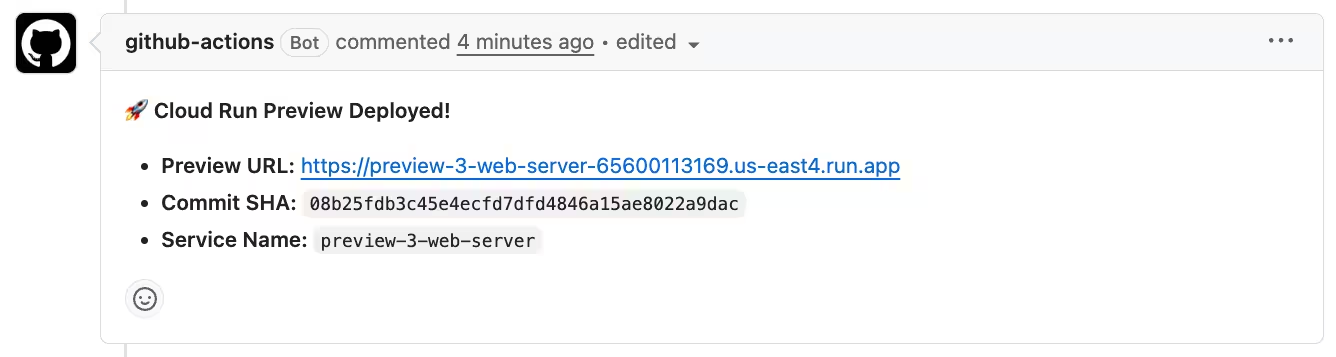
This workflow file deploys a new service with name preview-<PR number>-<prod service name>. Importantly, it sets the maximum instances to 1 in order to prevent runaway scaling on a service that should never receive high traffic. Once the service has been deployed, the workflow comments the service URL and commit number into the PR so that reviewers can quickly open the preview.
preview-deploy.yml
name: Deploy Cloud Run Preview

on:
  pull_request:
    types: [opened, synchronize, reopened]

env:
  PROJECT_ID: 'my-gcp-project-id'       # TODO: Replace with your Google Cloud Project ID
  PROJECT_NUMBER: '123456789012'        # TODO: Replace with your Google Cloud Project Number
  REGION: 'us-east4'                 # TODO: Replace with your Cloud Run region
  SERVICE_NAME: preview-${{ github.event.pull_request.number }}-my-service # TODO: Replace 'my-service' with your prod service name

# Automatically cancel an in-progress deploy if a newer commit is pushed to the same PR
concurrency:
  group: pr-preview-${{ github.event.pull_request.number }}
  cancel-in-progress: true

jobs:
  deploy-preview:
    name: Deploy Preview Service
    # SECURITY GUARD: Only run for branches inside this repository (ignore external forks)
    if: github.event.pull_request.head.repo.full_name == github.repository
    runs-on: ubuntu-latest
    permissions:
      contents: read          # Required for actions/checkout
      id-token: write         # Required for Google Workload Identity Federation (OIDC)
      pull-requests: write    # Required for gh pr comment

    steps:
      - name: Checkout code
        uses: actions/checkout@v4
        with:
          persist-credentials: false

      - name: Authenticate to Google Cloud
        uses: google-github-actions/auth@v2
        with:
          workload_identity_provider: projects/${{ env.PROJECT_NUMBER }}/locations/global/workloadIdentityPools/github-pool/providers/github-provider
          service_account: github-deployer@${{ env.PROJECT_ID }}.iam.gserviceaccount.com

      - name: Deploy preview service to Cloud Run
        env:
          PR_NUMBER: ${{ github.event.pull_request.number }}
        run: |
          # TODO: Replace 'pr-preview-runtime' with your runtime SA name
          # Add --allow-unauthenticated if needed
          gcloud run deploy "$SERVICE_NAME" \
            --region="$REGION" \
            --source=. \
            --min-instances=0 \
            --max-instances=1 \
            --build-service-account="projects/${PROJECT_ID}/serviceAccounts/cloud-run-builder@${PROJECT_ID}.iam.gserviceaccount.com" \
            --service-account="pr-preview-runtime@${PROJECT_ID}.iam.gserviceaccount.com" \
            --update-labels="managed-by=github-actions,env=pr-preview,pr=$PR_NUMBER"

      - name: Comment Preview URL on PR
        env:
          GH_TOKEN: ${{ secrets.GITHUB_TOKEN }}
          PR_NUMBER: ${{ github.event.pull_request.number }}
          COMMIT_SHA: ${{ github.event.pull_request.head.sha }}
          REPO: ${{ github.repository }}
        run: |
          SERVICE_URL="https://${SERVICE_NAME}-${PROJECT_NUMBER}.${REGION}.run.app"

          MARKER="<!-- cloud-run-preview-comment -->"
          BODY="🚀 **Cloud Run Preview Deployed!**
          - **Preview URL:** $SERVICE_URL
          - **Commit SHA:** \`$COMMIT_SHA\`
          - **Service Name:** \`$SERVICE_NAME\`
          $MARKER"

          # Find existing comment ID containing the marker
          COMMENT_ID=$(gh api "repos/$REPO/issues/$PR_NUMBER/comments" \
            --jq ".[] | select(.body | contains(\"$MARKER\")) | .id" 2>/dev/null || echo "")

          if [ -n "$COMMENT_ID" ]; then
            gh api -X PATCH "repos/$REPO/issues/comments/$COMMENT_ID" -f body="$BODY" >/dev/null
          else
            gh pr comment "$PR_NUMBER" --body "$BODY"
          fi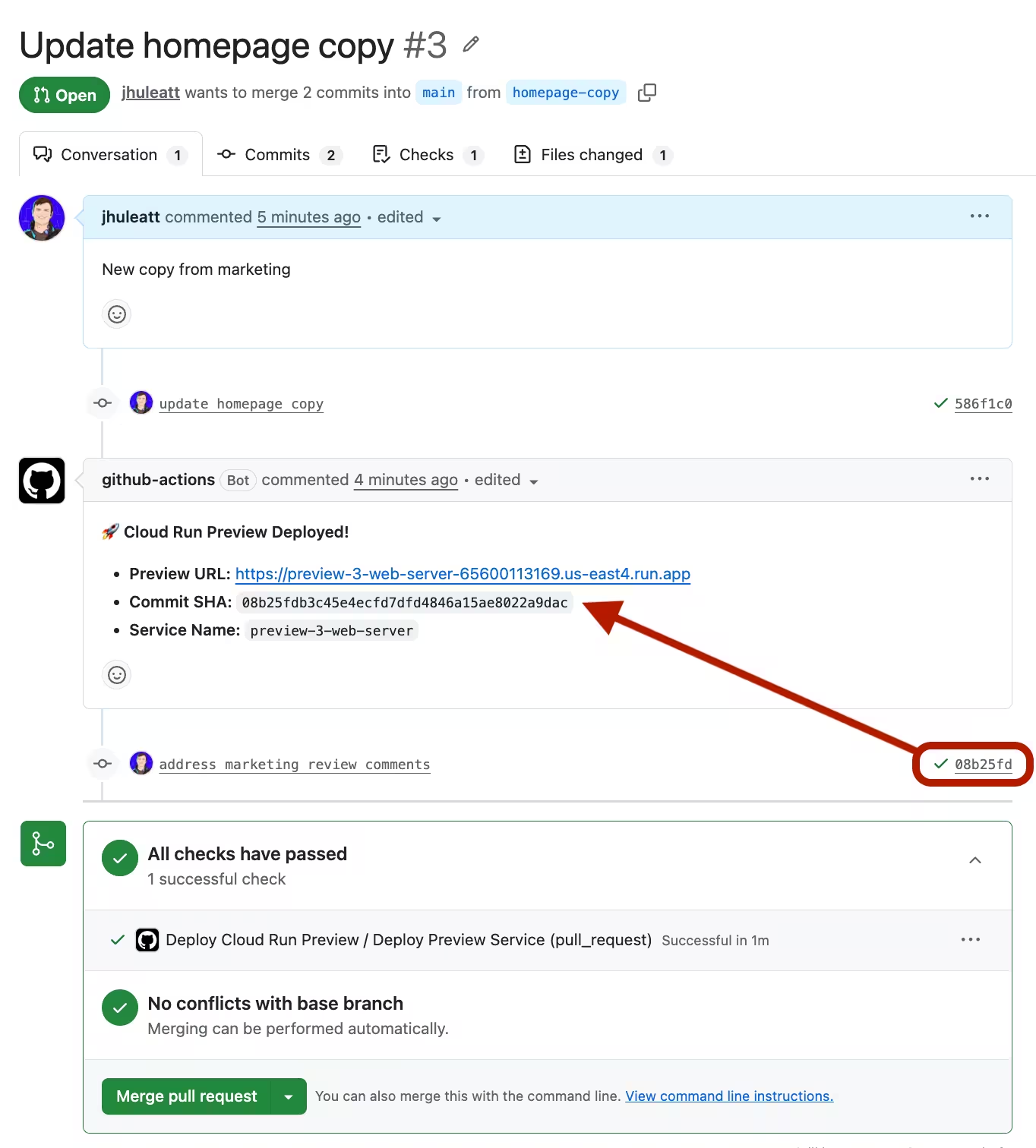
Notice that the comment gets updated for every new commit, so that you always know which commit’s changes have been deployed to the preview service.
Cloud Run service name
You can get more creative with the Cloud Run service name than the preview-<PR number>-<prod service name> name in my workflow. For example, you could include the PR title in the service name with github.event.pull_request.title.
Whatever you pick, just remember that Google Cloud Run service names have a maximum length of 49 characters. If the service name is too long, the deploy will fail, so you’ll need to truncate the name yourself.
Cleaning up
The above workflow will create lots of Cloud Run services in an active GitHub repo. In order to prevent surprise costs, it is important to clean up resources that aren’t needed any more.
Clean up images in Artifact Registry
Every commit in every PR will create a new container in Artifact Registry. In order to stop Artifact Registry usage from growing continuously, configure an automated cleanup policy by following the Google Cloud documentation on setting up a cleanup policy.
If it’s important to keep a long history of images for the production Run service, you can create an aggressive delete policy for previews, with a conditional keep policy for production containers.
Clean up Run services
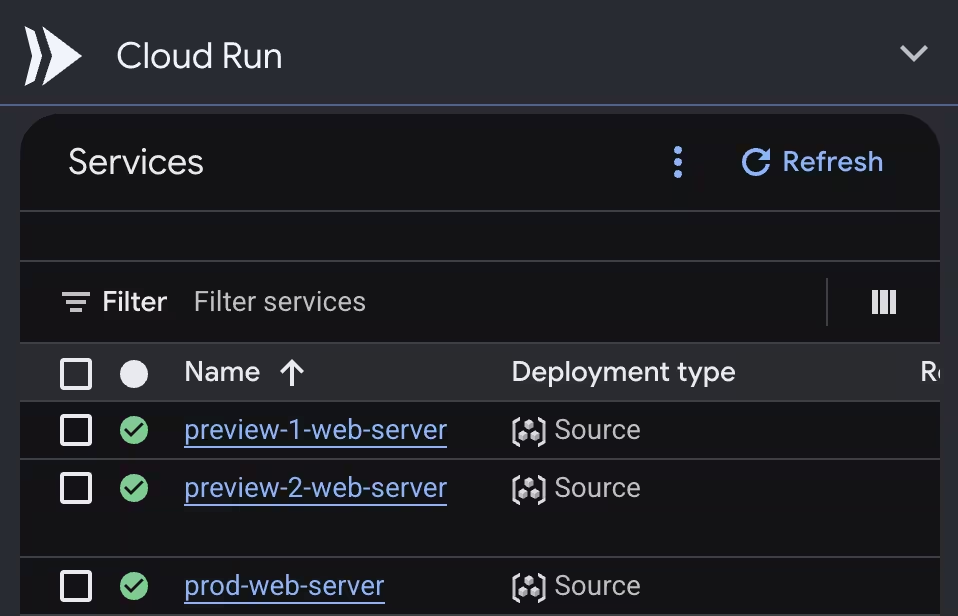
After a month or two, there could be hundreds or even thousands of preview services, most of which are no longer useful, as the PR they were created alongside will have been merged or abandoned. While Cloud Run’s autoscaling should mean those zombie services don’t have any active instances, it is best to delete them when they’re not needed any more.
Since going in and manually deleting all these services would be a chore, I set up workflows to automatically delete my preview services, too. There are two times when previews should be automatically deleted: when a PR is merged or closed, and when a PR becomes stale.
Delete on PR close
The following workflow deletes the preview Cloud Run service for a PR when that PR is closed.
preview-delete.yml
name: Delete Cloud Run preview on PR close

on:
  pull_request:
    types: [closed]

env:
  PROJECT_ID: 'my-gcp-project-id'       # TODO: Replace with your Google Cloud Project ID
  PROJECT_NUMBER: '123456789012'        # TODO: Replace with your Google Cloud Project Number
  REGION: 'us-east4'                 # TODO: Replace with your Cloud Run region
  SERVICE_NAME: preview-${{ github.event.pull_request.number }}-my-service # TODO: Replace 'my-service' with your prod service name

concurrency:
  group: pr-preview-${{ github.event.pull_request.number }}
  cancel-in-progress: false

jobs:
  delete-preview:
    name: Delete Preview Service
    # SECURITY GUARD: Only run for branches inside this repository (ignore external forks)
    if: github.event.pull_request.head.repo.full_name == github.repository
    runs-on: ubuntu-latest
    permissions:
      id-token: write         # Required for Google Workload Identity Federation

    steps:
      - name: Authenticate to Google Cloud
        uses: google-github-actions/auth@v2
        with:
          workload_identity_provider: projects/${{ env.PROJECT_NUMBER }}/locations/global/workloadIdentityPools/github-pool/providers/github-provider
          service_account: github-deployer@${{ env.PROJECT_ID }}.iam.gserviceaccount.com

      - name: Delete preview Cloud Run service
        run: |
          echo "Checking if service $SERVICE_NAME exists in region ${{ env.REGION }}..."

          if gcloud run services describe "$SERVICE_NAME" --region="${{ env.REGION }}" >/dev/null 2>&1; then
            echo "Deleting service $SERVICE_NAME..."
            gcloud run services delete "$SERVICE_NAME" --region="${{ env.REGION }}" --quiet
            echo "Successfully deleted $SERVICE_NAME"
          else
            echo "Service $SERVICE_NAME does not exist or was already deleted."
          fi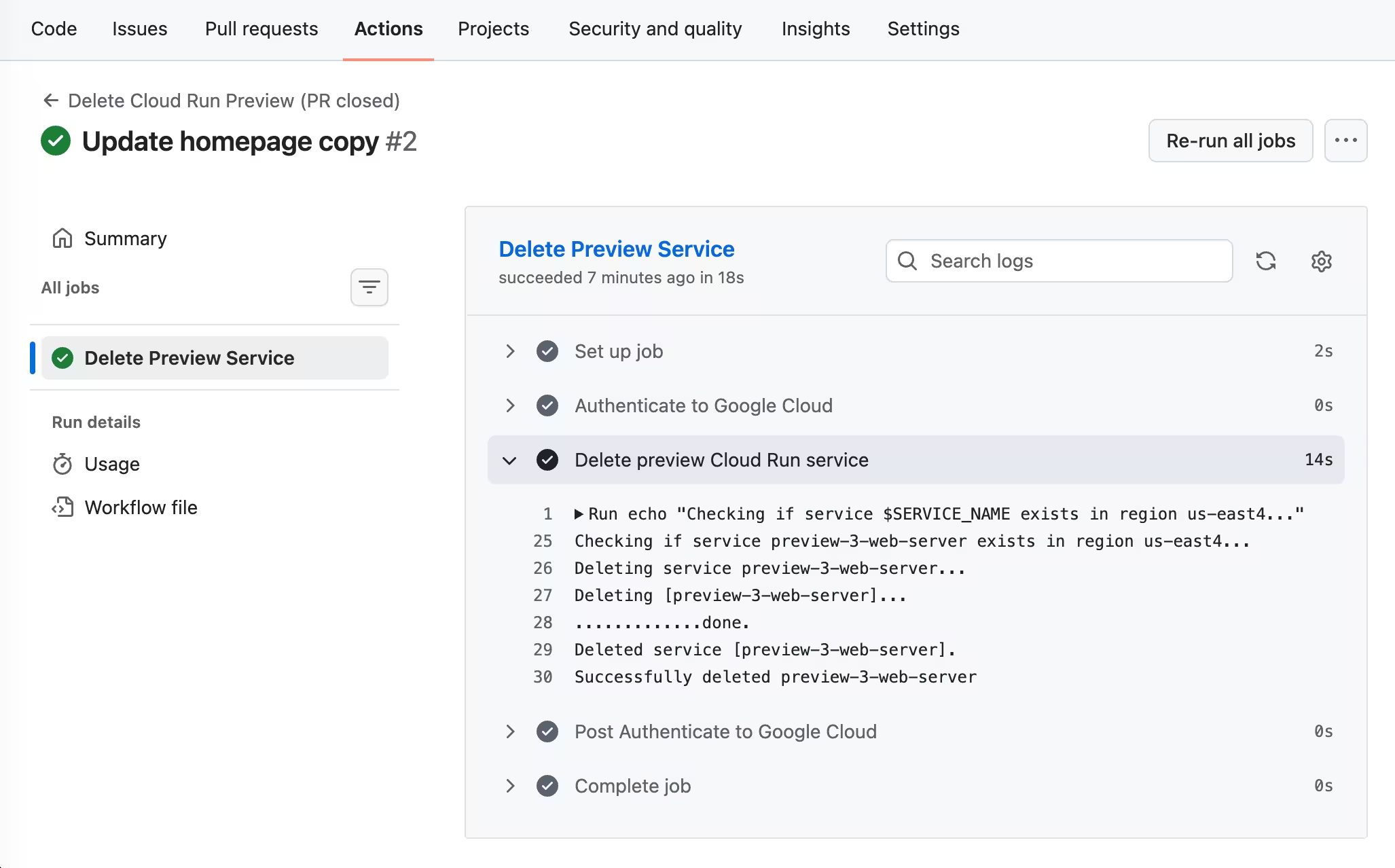
Delete when a PR is stale
Sometimes, PRs go stale. The definition of “stale” can differ between every project, but in this case I’ve implemented a cron job that runs once per day and deletes the preview Cloud Run service of any PR that has been inactive for 30 days or more. It also posts a comment on the PR explaining that the service has been cleaned up.
preview-cleanup.yml
name: Clean up inactive Cloud Run previews

on:
  schedule:
    - cron: '0 8 * * *'  # Runs once a day at 08:00 UTC
  workflow_dispatch:     # Allows running manually from the Actions tab

env:
  PROJECT_ID: 'my-gcp-project-id'       # TODO: Replace with your Google Cloud Project ID
  PROJECT_NUMBER: '123456789012'        # TODO: Replace with your Google Cloud Project Number
  REGION: 'us-east4'                 # TODO: Replace with your Cloud Run region
  PROD_SERVICE_NAME: 'my-service'       # TODO: Replace with your production Cloud Run service name

jobs:
  reap-inactive-previews:
    name: Reap Inactive Previews
    runs-on: ubuntu-latest
    permissions:
      id-token: write         # Required for Google Workload Identity Federation
      pull-requests: write    # Required to comment on inactive PRs

    steps:
      - name: Authenticate to Google Cloud
        uses: google-github-actions/auth@v2
        with:
          workload_identity_provider: projects/${{ env.PROJECT_NUMBER }}/locations/global/workloadIdentityPools/github-pool/providers/github-provider
          service_account: github-deployer@${{ env.PROJECT_ID }}.iam.gserviceaccount.com

      - name: Find and Delete Stale Preview Services
        env:
          GH_TOKEN: ${{ secrets.GITHUB_TOKEN }}
        run: |
          # Calculate timestamp for 30 days ago in seconds since epoch
          CUTOFF_SEC=$(date -d "30 days ago" +%s)
          echo "Searching for open PRs with no activity since $(date -d '30 days ago' --utc)"

          # Fetch all open PRs with number and last update time
          PRS=$(gh pr list --state open --limit 100 --json number,updatedAt)

          echo "$PRS" | jq -c '.[]' | while read -r pr; do
            PR_NUM=$(echo "$pr" | jq -r '.number')
            UPDATED_AT=$(echo "$pr" | jq -r '.updatedAt')
            UPDATED_SEC=$(date -d "$UPDATED_AT" +%s)

            if [ "$UPDATED_SEC" -lt "$CUTOFF_SEC" ]; then
              SERVICE_NAME="preview-${PR_NUM}-${PROD_SERVICE_NAME}"
              echo "PR #${PR_NUM} inactive since ${UPDATED_AT}. Checking service: ${SERVICE_NAME}..."

              if gcloud run services describe "$SERVICE_NAME" --region="${REGION}" >/dev/null 2>&1; then
                echo "Deleting stale preview service: ${SERVICE_NAME}..."
                gcloud run services delete "$SERVICE_NAME" --region="${REGION}" --quiet

                COMMENT_BODY="♻️ **Cloud Run Preview Service Cleanup**

                The preview service \`${SERVICE_NAME}\` was automatically deleted due to 30 days of inactivity on this PR.

                > **Note:** If you resume work on this PR, push a new commit to the branch and a fresh preview environment will be deployed automatically."

                echo "Commenting on PR #${PR_NUM}..."
                gh pr comment "$PR_NUM" --body "$COMMENT_BODY"
              else
                echo "Service ${SERVICE_NAME} is already deleted or was never deployed."
              fi
            fi
          done
The service can be re-created by pushing a new commit to the PR, which will trigger a new deployment from the preview workflow above.
Considerations
Contributions from external contributors
My example preview workflow only allows previews to be created from branches within the repository. It won’t run for pull requests from forks. You could lock this down even more by only allowing certain branches to activate the workflow. For example, you could have an alpha branch with its own branch protection rules as the only branch that triggers the workflow.
Or, if you do want to allow external contributors’ PRs to generate previews, turn on “Require approval for all external contributors” in the GitHub Actions settings for a repo. Letting anyone with a fork open a PR and deploy their code to Cloud Run in your Google Cloud project poses potential billing and security risks, but the extra approval step helps mitigate that a bit, as long as you’re only clicking “Approve” for PRs from contributors that you trust.
GitHub Actions vs Cloud Build
I chose to implement this in GitHub Actions, but I could have used Cloud Build instead. They each have their pros and cons.
The main benefit of GitHub Actions is being able to trigger the cleanup workflow when a PR closes, which Cloud Build doesn’t support. In Cloud Build, cleanup would have to happen entirely with the stale preview cron job. That’s not the end of the world, but I’d like the services to be deleted as quickly as possible after a PR is closed.
On the other hand, Cloud Build would have let me skip all of the Workload Identity Federation setup. That’s a big benefit when it comes to setting up previews quickly in a new repository.
Conclusion
It takes a few steps, but now I have a reliable way to set up automatic preview deployments for my Cloud Run web services. This workflow makes it easier to quickly try out and share new ideas without having to run any manual deploy commands myself, and, as a bonus, I learned about WIF along the way.
I hope this helps you set up a preview workflow for Cloud Run, too. If you want to see other approaches to previews with Cloud Run, take a look at these posts:
- Deploying to Cloud Run with GitHub Actions by Google Cloud
- Build your own preview deployment service by Maxime Heckel
- How to Set Up Continuous Deployment to Cloud Run Using GitHub Actions by OneUptime Engineering